
Step-by-Step Instructions to Setup Your SURE Universal Remote for IR (Infrared) Devices
The SURE Universal Remote supports both WiFi and IR devices.
SURE can be downloaded on all Android IR devices, such as: Galaxy, Samsung, LG etc.
Once you have downloaded the SURE Universal Remote control read the step-by-step instructions below to learn how to add your IR (infrared) devices or watch the training video:
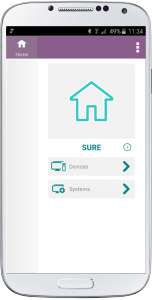
1. Click “Devices” on the Home Screen
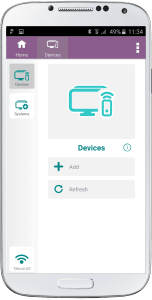
2. Click “Add”
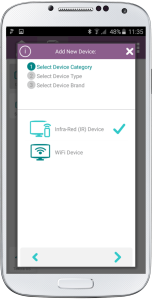
3. Check that Infra-Red (IR) Device is selected
Click the right arrow at the bottom of the screen
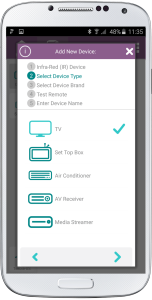
4. Select the Device Type. This can be your TV, set-top box, cable box, AV receiver, media steamer, disc player, air conditioner etc.
Then click the right arrow at the bottom of the screen
5. Select the Device Brand. SURE has an extensive brand database. We support anything from Samsung, LG, Sony to Haier. If we are missing your brand please let us know via this form.
Click the right arrow at the bottom of the screen
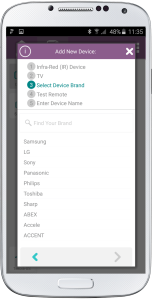
6. Please wait for a few seconds while we search for all the devices that meet the criteria.
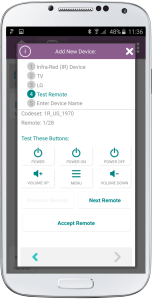
Our database is very large and in order to find your specific model we need to run a test. This is very simple.
a. Take a note of how many tests are next to the “Remote” above the test buttons. (This is the maximum number of tests you need to run until we find your device)
b. Click the “Power On” button to check if this is your device
c. If your device switches on check the other buttons such as Volume Up, Volume Down etc. and if everything works click “Accept Remote” and click the right arrow at the bottom of the screen
d. If not, click “Next Remote” and return to “b” above and keep running each test until the device responds to all the buttons
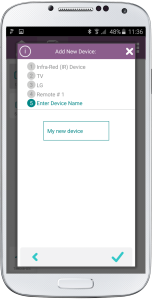
7. Give a name to your device and click the “check” on the bottom right of the screen.
8. Congratulations. Your device will now appear on the left navigation.
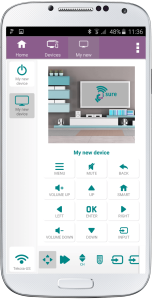
Now you can add additional IR devices or you can now add WiFi devices.
If you have multiple devices that you use together, such as a home cinema, you can set these up in one SURE System. This will enable you to turn them all on and off with one click.
Social
关注我们